_ Loading Project Library...

// deployment registry

Architecture Gallery

A curated showcase of production-grade infrastructure, serverless patterns, and high-availability cloud-native systems.
Project Architecture
Zoom Blueprint

Cloud Native Portfolio

Elite Cloud-Native Portfolio | Serverless Messaging Backend | Honeypot Anti-Bot Security | Terraform IaC | AWS (Lambda, API Gateway, Route 53, CloudFront, S3, DynamoDB) | Automated CI/CD. A high-fidelity DevOps showcase featuring atomic deployments, security-first engineering, and automated infrastructure management.

aiautomationawsci-cdcloud-nativecloudfrontdevopsdynamodbemailjsgithub-actions
Code

// architecture

Cloud Native Portfolio
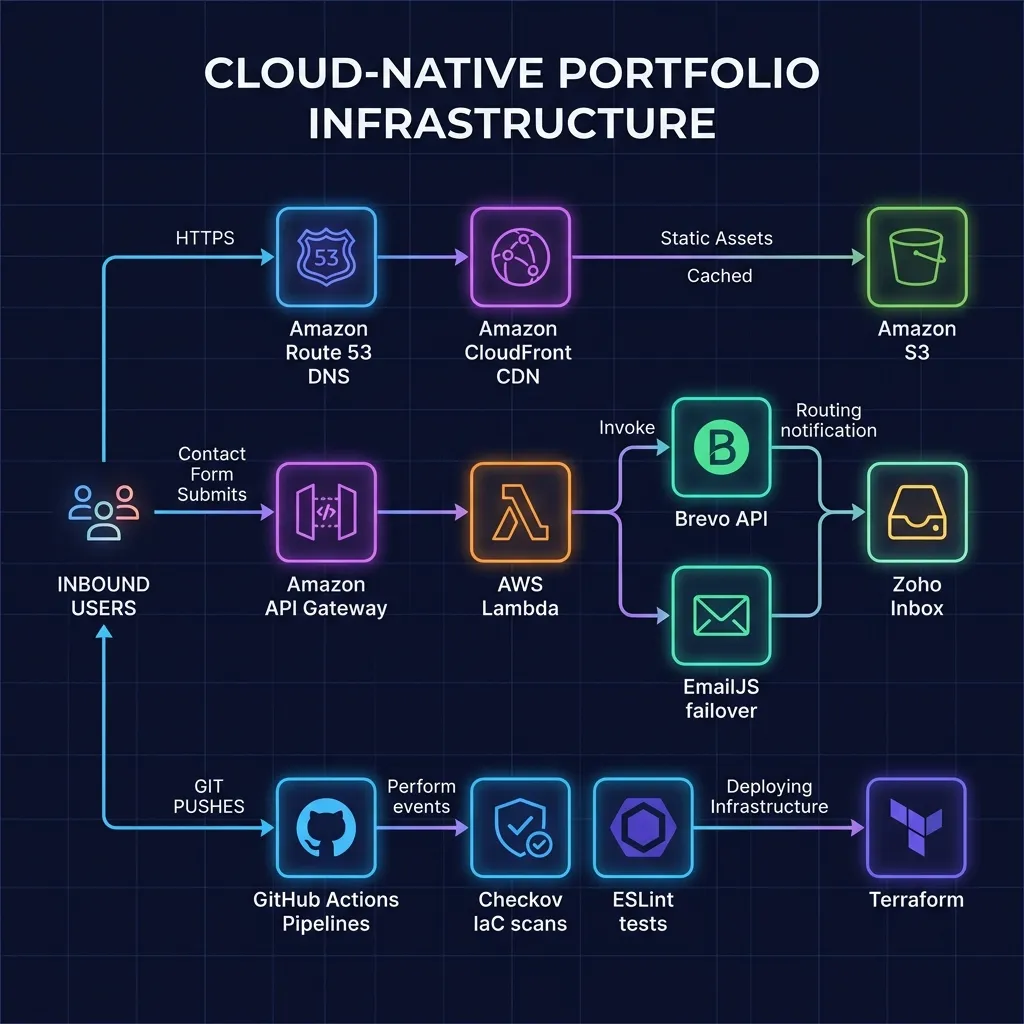
S3 Bucket Static Web Hosting fronted by CloudFront CDN Edge Caching
API Gateway Ingress routing contacts to AWS Lambda serverless microservice
Brevo SMTP Mail Integration & Client-Side EmailJS Failover Controller
Checkov Security Scans & ESLint quality gates built in CI/CD pipeline
Terraform Declarative IaC managing all Route 53, ACM, and serverless resources
Problem:Manual build steps, missing infrastructure quality gates, and static message delivery endpoints create security vulnerabilities and maintenance drift.
Fix:Engineered a serverless GitOps pipeline featuring Checkov quality checks, S3/CloudFront atomic hosting, and an API Gateway/Lambda hybrid contacts fallback endpoint.
Project Architecture
Zoom Blueprint

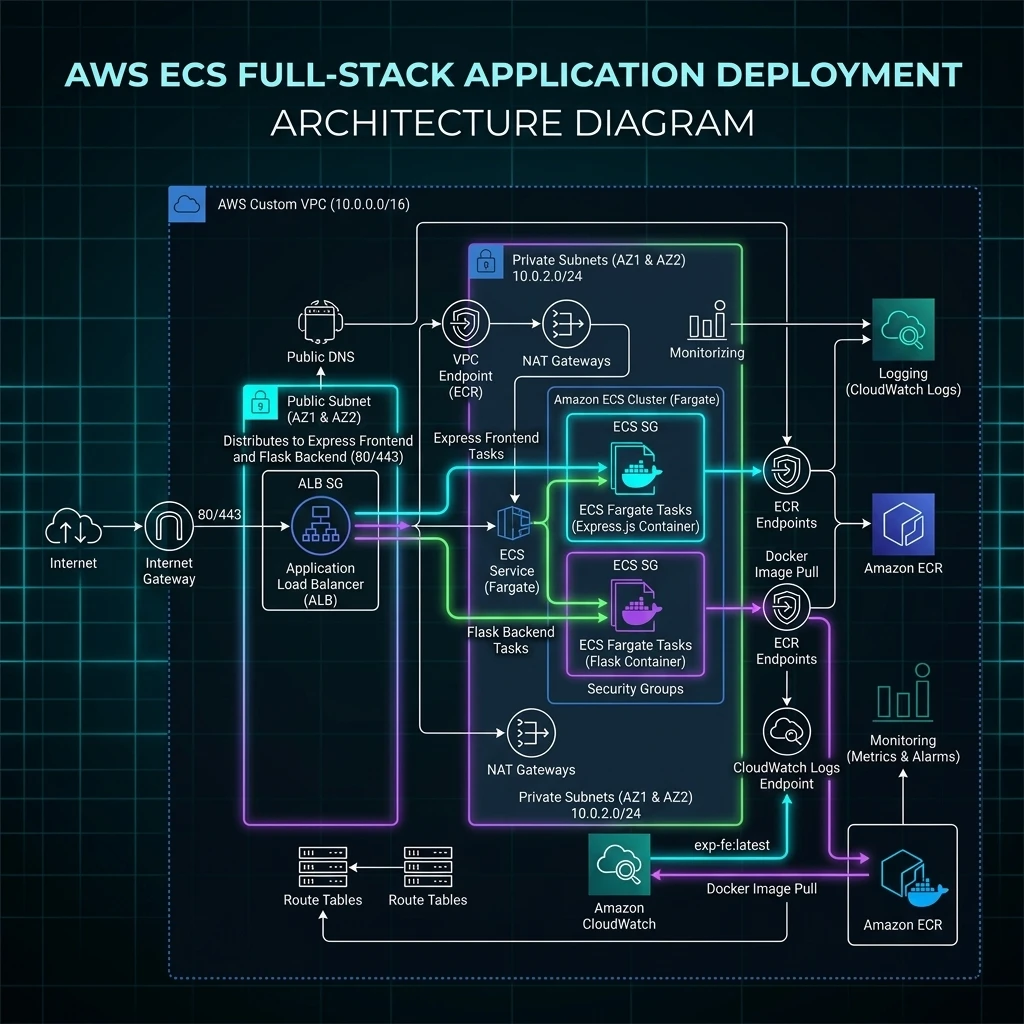
Terraform For Deploying Simple Frontend Backend App Using Docker AWS VPC ECR And ECS Fargate

This project deploys a Flask backend and Express frontend using Docker and AWS ECS Fargate. Managed via Terraform, it features a VPC for isolation, an ALB for path-based routing, and ECR for image hosting. It includes secure private subnets, CloudWatch logging, and automated infrastructure as code (IaC) workflows.

albautomationawsbackendcicdcloudwatchdevopsdockerecrecs
Code

// architecture

Terraform For Deploying Simple Frontend Backend App Using Docker AWS VPC ECR And ECS Fargate
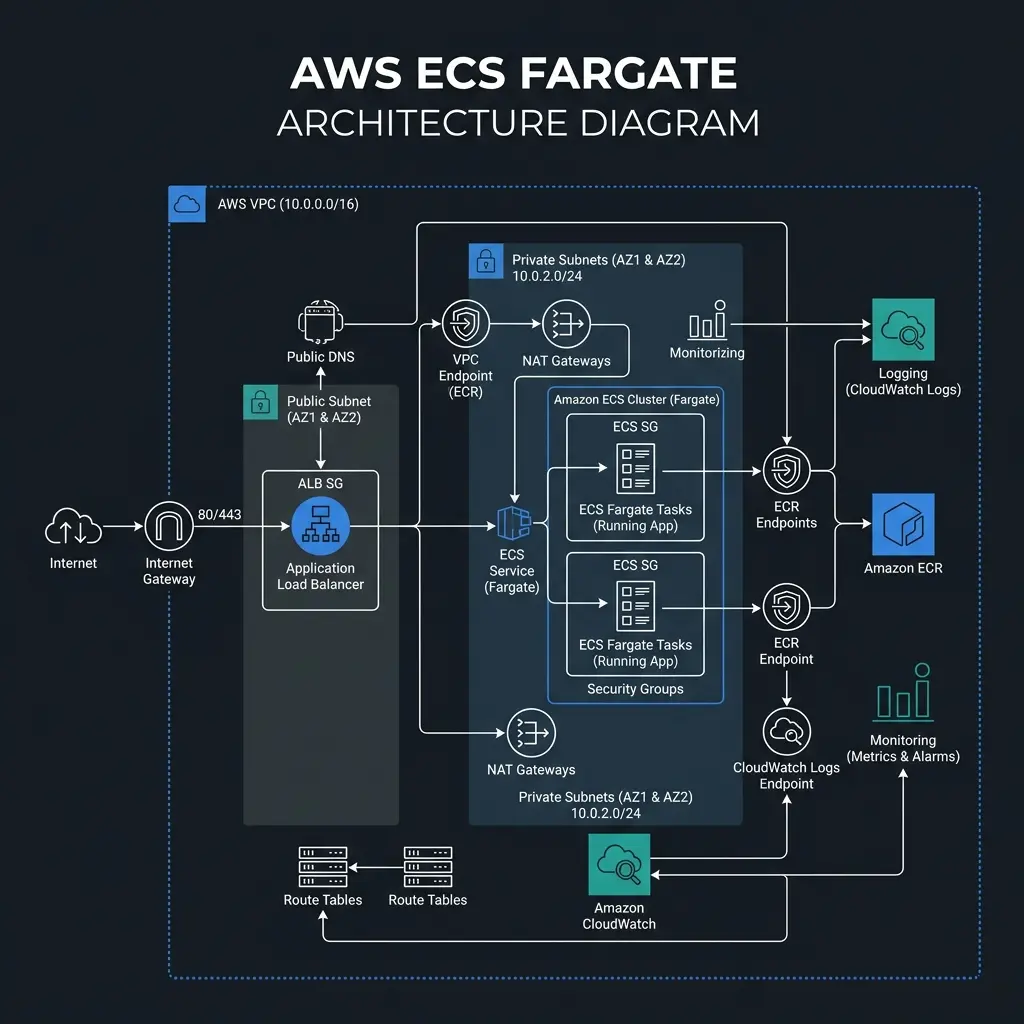
ALB Port Listener Routing (Port 80 ➔ Express, Port 5000 ➔ Flask)
ECS Service Connect (Secure Internal DNS microservice-to-microservice traffic)
Private VPC Subnets (Total task isolation, zero public IP exposure)
NAT Gateways & ECR VPC Endpoints (Secure container image pulling)
Encrypted CloudWatch Logging (KMS Customer Managed Key & Rotation)
Problem:High operational overhead of managing EC2 servers, environment drifts, and insecure public exposure of microservices.
Fix:Architected a serverless AWS ECS Fargate cluster hosting containerized services inside private subnets, utilizing ECS Service Connect for secure internal discovery and port-based ALB routing managed by Terraform IaC.
Project Architecture
Zoom Blueprint

Terraform For Deploying Both Flask And Express On A Seprate EC2 Instances
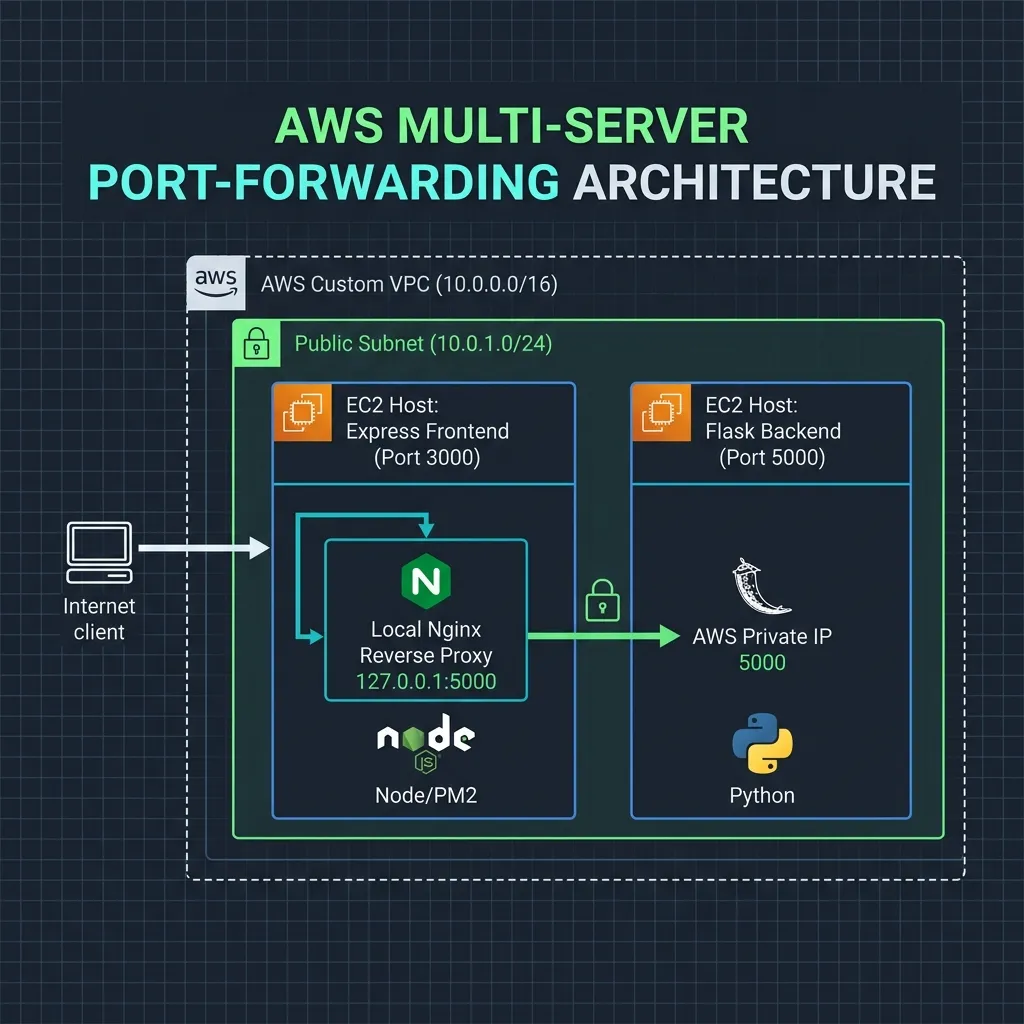
Terraform script | Automates deployment of Flask backend and Express frontend on separate EC2 instances | Provisions VPC, security groups, and Nginx reverse proxy | Ensures isolated, scalable, and accessible infrastructure | Modular design

automationawsbackend-frontendcloudcloud-deploymentdevopsec2expressjsflaskinfrastructure-as-code
Code

// architecture

Terraform For Deploying Both Flask And Express On A Seprate EC2 Instances

Express (3000) ➔ Nginx Proxy (127.0.0.1:5000) ➔ Flask Private IP (5000)
Separate AWS EC2 Instances
Custom VPC & Public Subnet Routing
Idempotent Shell Provisioning (User Data)
VPC Security Group Rules
Git Sparse Directory Checkout
Problem:Manual provisioning of multi-tier apps causes configuration drift, while exposing backend database/API ports to the public internet creates severe security vulnerabilities.
Fix:Developed modular Terraform blueprints and shell setups to spin up separate EC2 hosts, utilizing local Nginx reverse proxies to keep backend communications isolated inside the private VPC network.
Project Architecture
Zoom Blueprint

Terraform For Deploying Both Flask And Express On A Single EC2 Instance
This Terraform script sets up an EC2 instance on AWS and deploys both a Flask application and an Express application on it. The script includes the necessary configurations for security groups, key pairs, and user data to automate the deployment process.

automationawsclouddeploymentdevopsec2expressflaskfull-stackhcl
Code

// architecture

Terraform For Deploying Both Flask And Express On A Single EC2 Instance

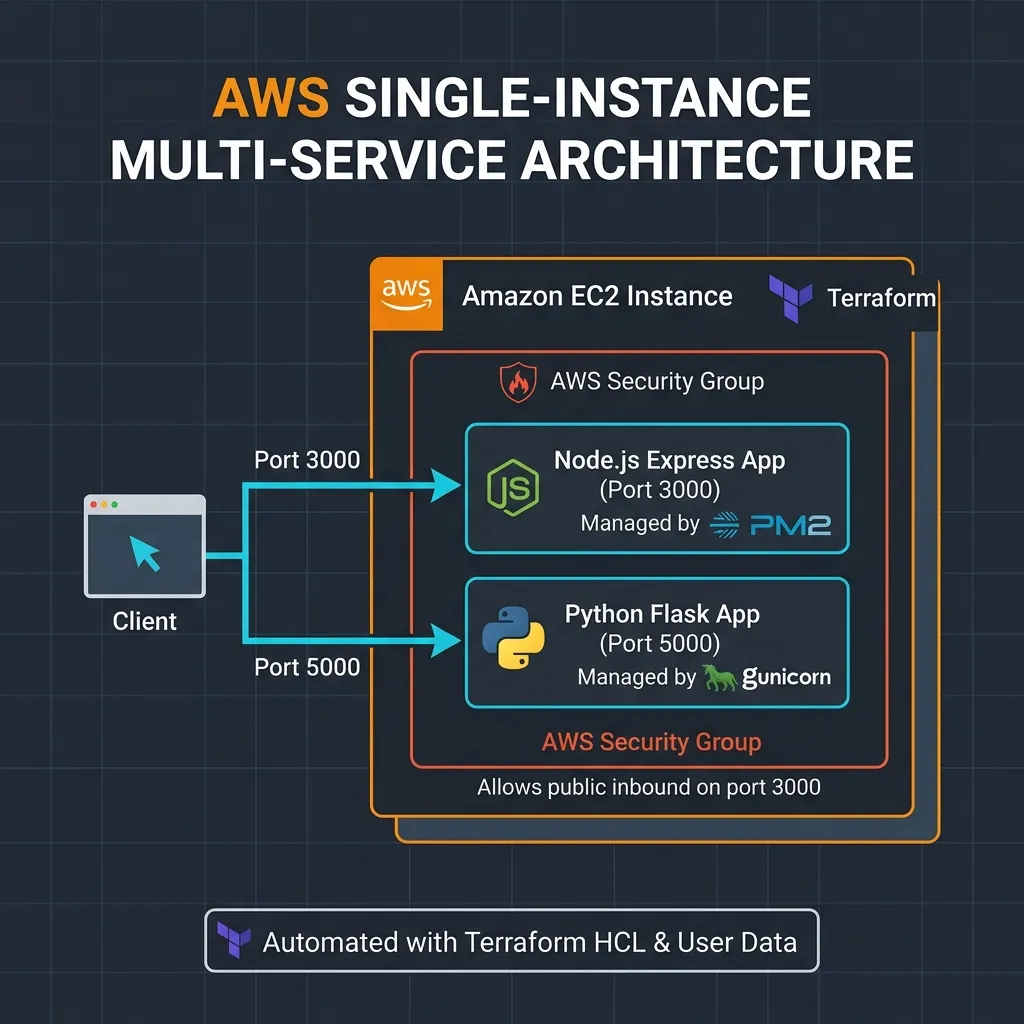
Public Traffic ➔ AWS Security Group Inbound Filters (Ports 3000 & 5000)
Single Amazon EC2 Compute Host Instance
Node.js Express App (Port 3000) running under PM2 Manager
Python Flask App (Port 5000) running under Gunicorn WSGI
Idempotent Bash Shell Provisioning (User Data Script)
Problem:Manual provisioning and co-locating multi-stack services on a single host leads to environment conflicts, configuration drift, and insecure exposed ports.
Fix:Designed modular Terraform HCL blueprints to provision a single EC2 instance with custom security groups, automating the deployment of both Express (PM2) and Flask (Gunicorn) apps via custom bash shell scripts.
Project Architecture
Zoom Blueprint

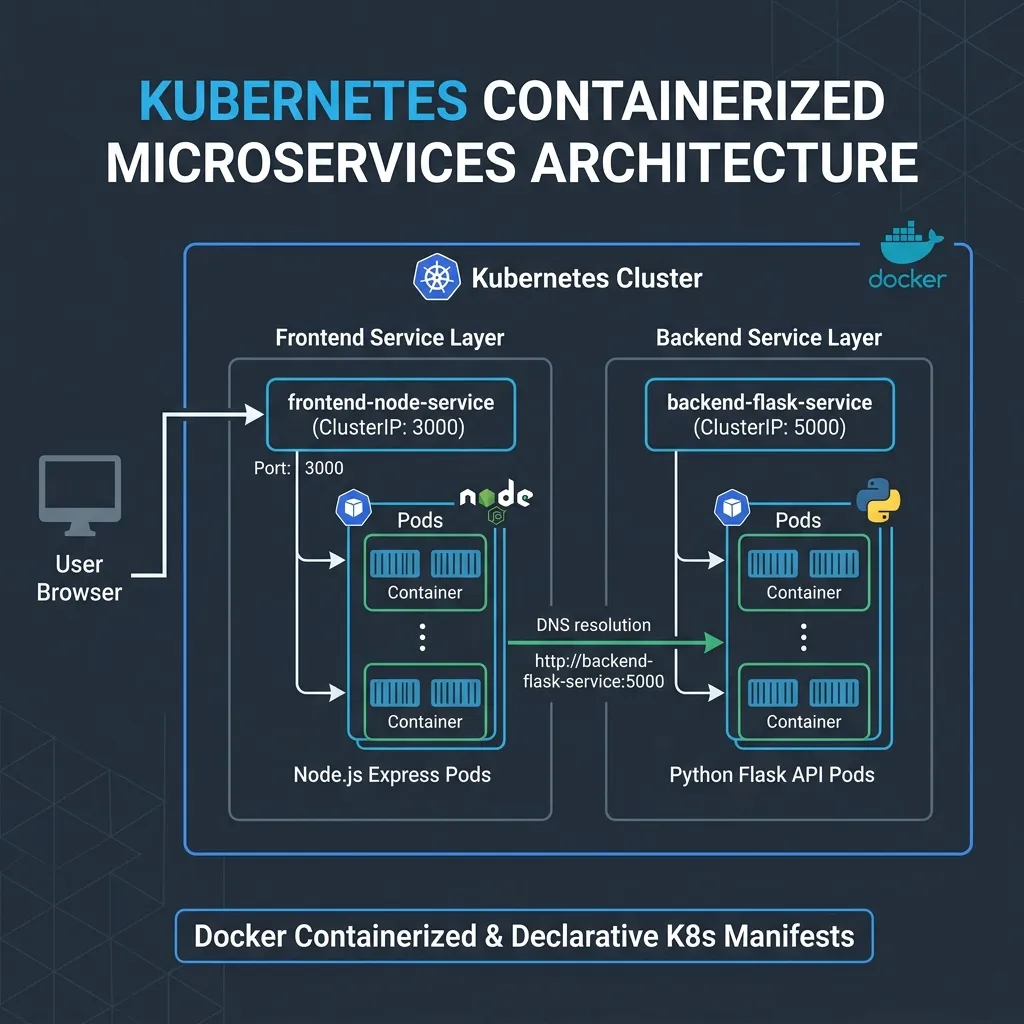
K8s Simple Frontend Backend Node Flask App
Full-stack web application | Node.js/Express frontend with Flask backend | Kubernetes-ready deployment | Docker containerized microservices | Form-based user interface | REST API backend | Production-grade infrastructure-as-code | Multi-service orchestration | Cloud-native application architecture

backend-apici-cdcloud-deploymentcontainerizationdevopsdockerdocker-composeeducational-projectexpressflask
Code

// architecture

K8s Simple Frontend Backend Node Flask App

External Access ➔ Node.js/Express Web Service (ClusterIP: 3000)
Node.js Frontend Pods ➔ K8s CoreDNS resolution ➔ Flask Backend Service (ClusterIP: 5000)
Replicated Pods & Decoupled Containerized Stacks
Declarative Deployment & Service Manifests (YAML)
Explicit Pod Resource Constraints (Limits & Requests)
Problem:Managing distributed multi-tier apps manually causes environment drift, port conflicts, and complex inter-service discovery.
Fix:Containerized both application tiers via multi-stage Dockerfiles and architected declarative Kubernetes manifests to handle microservice discovery, resource allocation, and environment variable routing via internal ClusterIP DNS.
Project Architecture
Zoom Blueprint

Hosting Simple Full Stack App Using Docker Container AWS VPC ECR ECS Services
Deploy a simple full stack application featuring a Flask backend (port 5000) and Express frontend (port 3000) using Docker containers. Utilize AWS ECR, ECS, and VPC for cloud-native orchestration and scalable deployment.

awsbackendcicdcloud-computingcloud-deploymentcontainerdevopsdockerecrecs
Code

// architecture

Hosting Simple Full Stack App Using Docker Container AWS VPC ECR ECS Services

Express Web Server Container ➔ ALB ➔ Python Flask API Container
AWS ECS Fargate Orchestrated Services & Task Definitions
AWS ECR Private Image Registries
Multi-AZ Public & Private Subnet Isolation (AWS VPC)
Application Load Balancer (ALB) Public Ingress Gateway
Problem:Deploying and scaling multi-stack containerized microservices manually without orchestration introduces severe operational complexity, security vulnerabilities, and deployment downtime.
Fix:Architected an AWS ECS Fargate orchestration model deploying containerized microservices in multi-AZ private subnets, frontend by an Application Load Balancer (ALB) with secure ECR pipelines.
Project Architecture
Zoom Blueprint

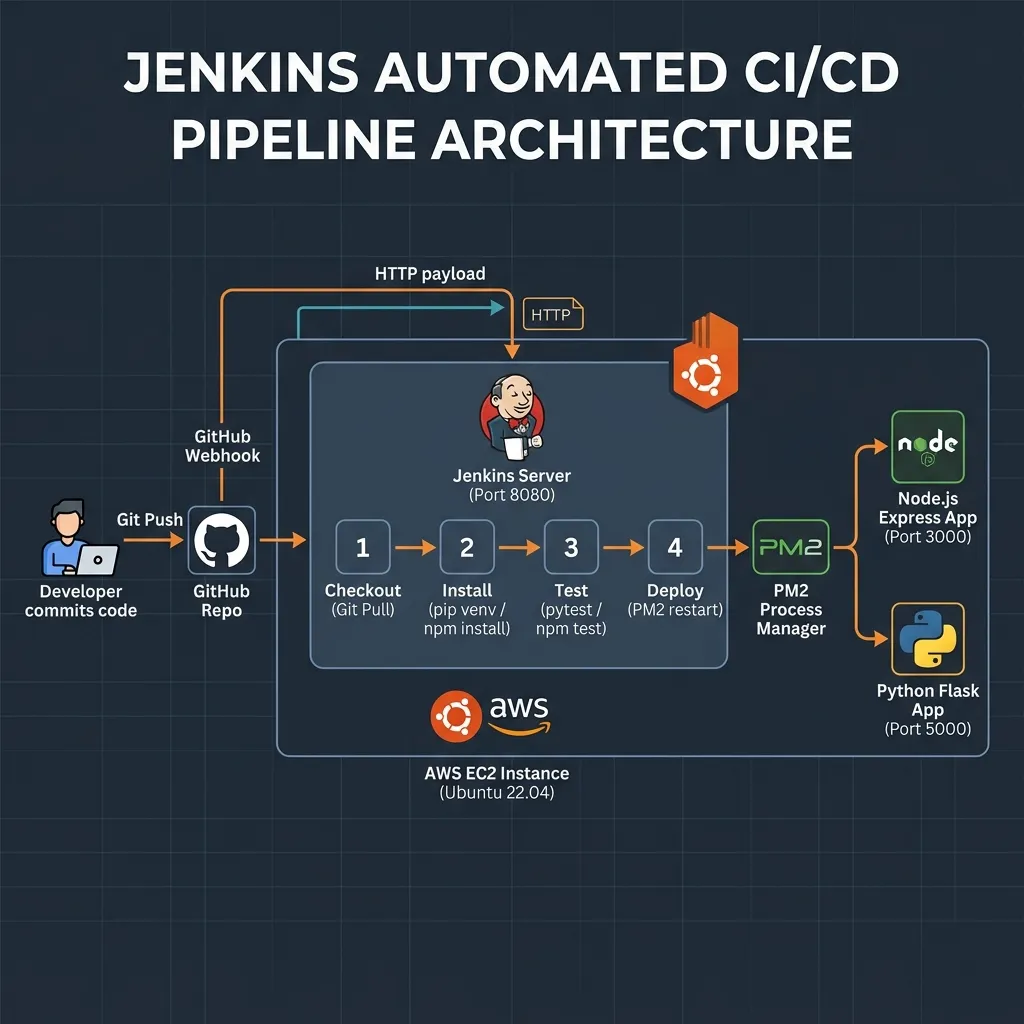
Flask Express Cicd Jenkins Github Webhooks Aws Ec2
This project establishes a fully automated CI/CD pipeline on a single AWS EC2 instance. Integrating GitHub webhooks and an automated Jenkins master server, it orchestrates code checkout, dependencies installation (Python venv and npm), pytest unit testing, and host application restarts under the PM2 process manager.

automationawsbackendci-cddevopsec2expressflaskfrontendgithub-webhooks
Code

// architecture

Flask Express Cicd Jenkins Github Webhooks Aws Ec2

Git Push ➔ GitHub Webhook ➔ Jenkins Pipeline (Port 8080)
Amazon EC2 Instance Host (Ubuntu 22.04 LTS)
Automated Multi-Stage Pipeline (Checkout, Install, Test, Deploy)
Host Process Management (PM2 Service Controller)
Sudoers Permission Delegations (NOPASSWD for PM2)
Problem:Manual SSH code pulls and server restarts slow down deployment cycles, lead to configuration drift, and lack reliable automated test feedback loops.
Fix:Configured a local Jenkins build pipeline on the EC2 target triggered by GitHub webhooks to dynamically test applications and orchestrate seamless PM2 hot-reloads under a secure permissions framework.
Project Architecture
Zoom Blueprint

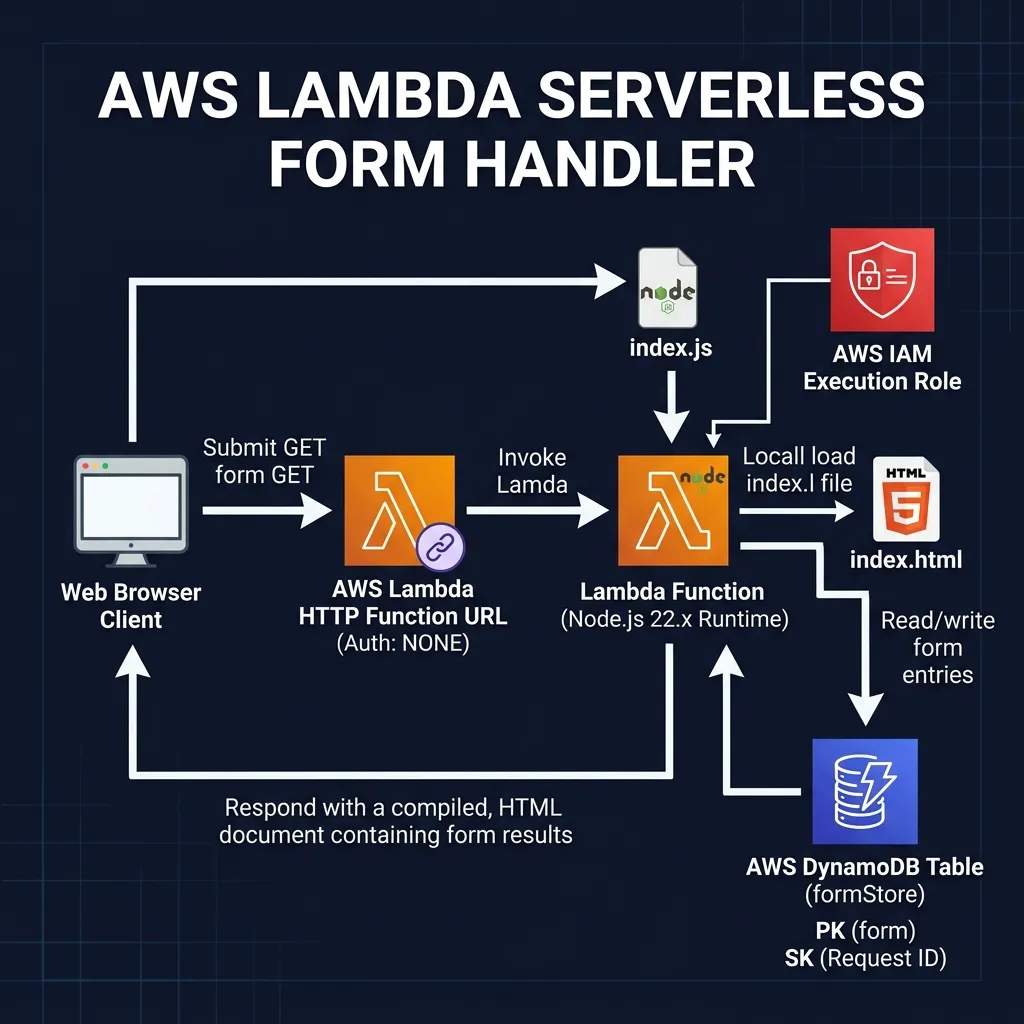
AWS Lambda Http Function Url Tutorial

AWS Lambda HTTP Form Handler Tutorial | Step-by-step guide for building a serverless form handler with AWS Lambda | Store submissions in DynamoDB | Real-time results display | Includes IAM setup & troubleshooting | Ideal for AWS and serverless development beginners

apiautomationawsaws-lambdabackendbeginner-friendlycloud-computingdynamodbform-handlerhtml
Code

// architecture

AWS Lambda Http Function Url Tutorial
HTTP Ingress ➔ AWS Lambda HTTP Function URL (Auth: NONE)
AWS Lambda Serverless Compute (Node.js 22.x Runtime)
DynamoDB Submissions Table (Partition Key: PK, Sort Key: SK)
AWS IAM Execution Policy (Scan/Put Permissions for Table)
Dynamic Server-Side HTML Template Compile
Problem:Provisioning, patching, and maintaining dedicated virtual machine servers (like EC2) for low-traffic forms or simple microservice endpoints creates high cost and operational overhead.
Fix:Architected a completely serverless, event-driven form handler that dynamically compiles HTML and persists form payloads to DynamoDB on-demand, running on AWS Lambda with zero idle costs.
Project Architecture
Zoom Blueprint

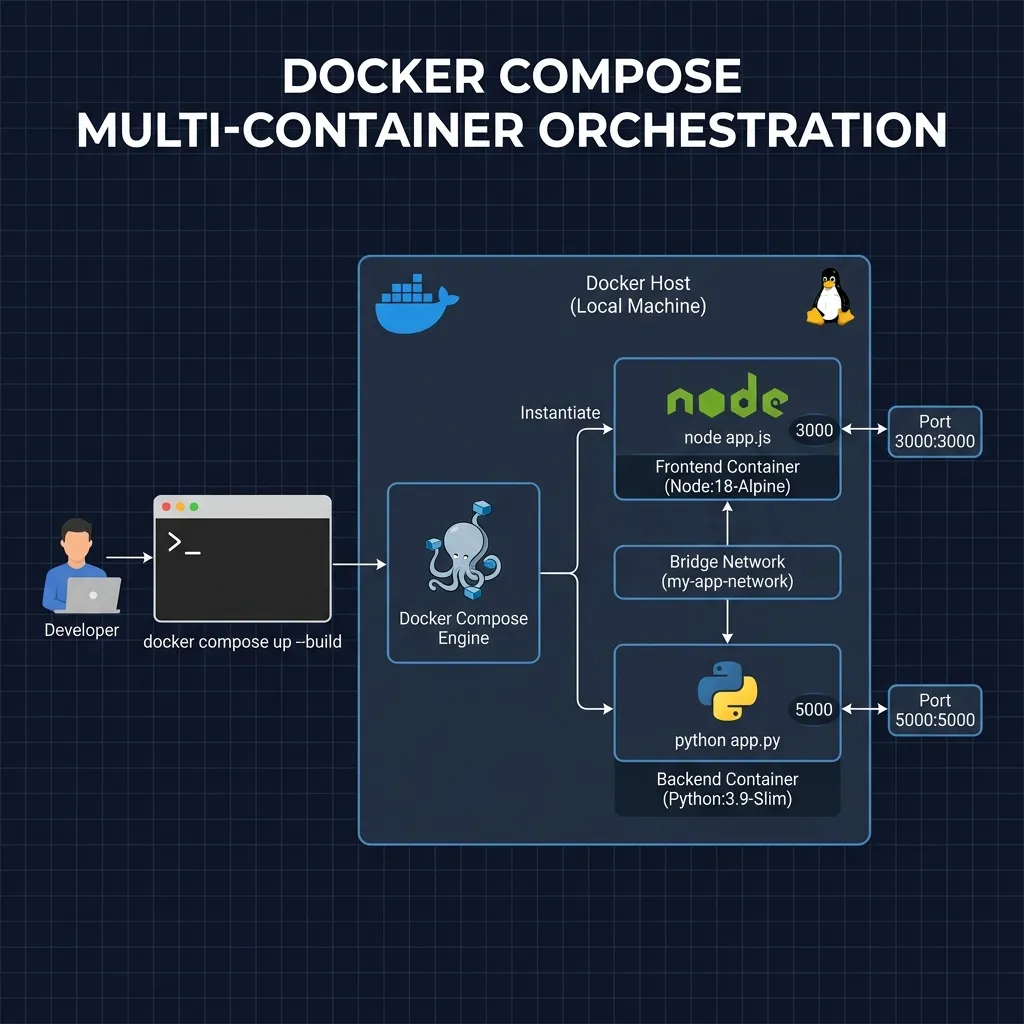
Setup Full Stack App With Docker Compose
Docker Assignment Frontend (Node.js) and Backend (Flask) | Full Stack Application | Seamless integration using Docker Compose | Modular codebase with HTML, JavaScript, and Python | Easy deployment and local development

apibackendcontainerizationdeploymentdevopsdockerdocker-composeflaskfrontendfull-stack
Code

// architecture

Setup Full Stack App With Docker Compose

User Request ➔ Frontend Port 3000 (Exposed Host) ➔ Backend Port 5000 (Exposed Host)
Docker Compose Multi-Container Orchestration (YAML Engine)
Frontend Container (Node.js Node:18-Alpine Host)
Backend Container (Python Python:3.9-Slim Host)
Bridge Virtual Network (my-app-network Bridge)
Problem:Manual multi-service container building, port linking, and virtual networking on local environments leads to configuration errors and operational friction.
Fix:Consolidated Node.js web and Flask API containers into a unified Docker Compose manifest leveraging an isolated bridge network for seamless local microservice orchestration.
Project Architecture
Zoom Blueprint

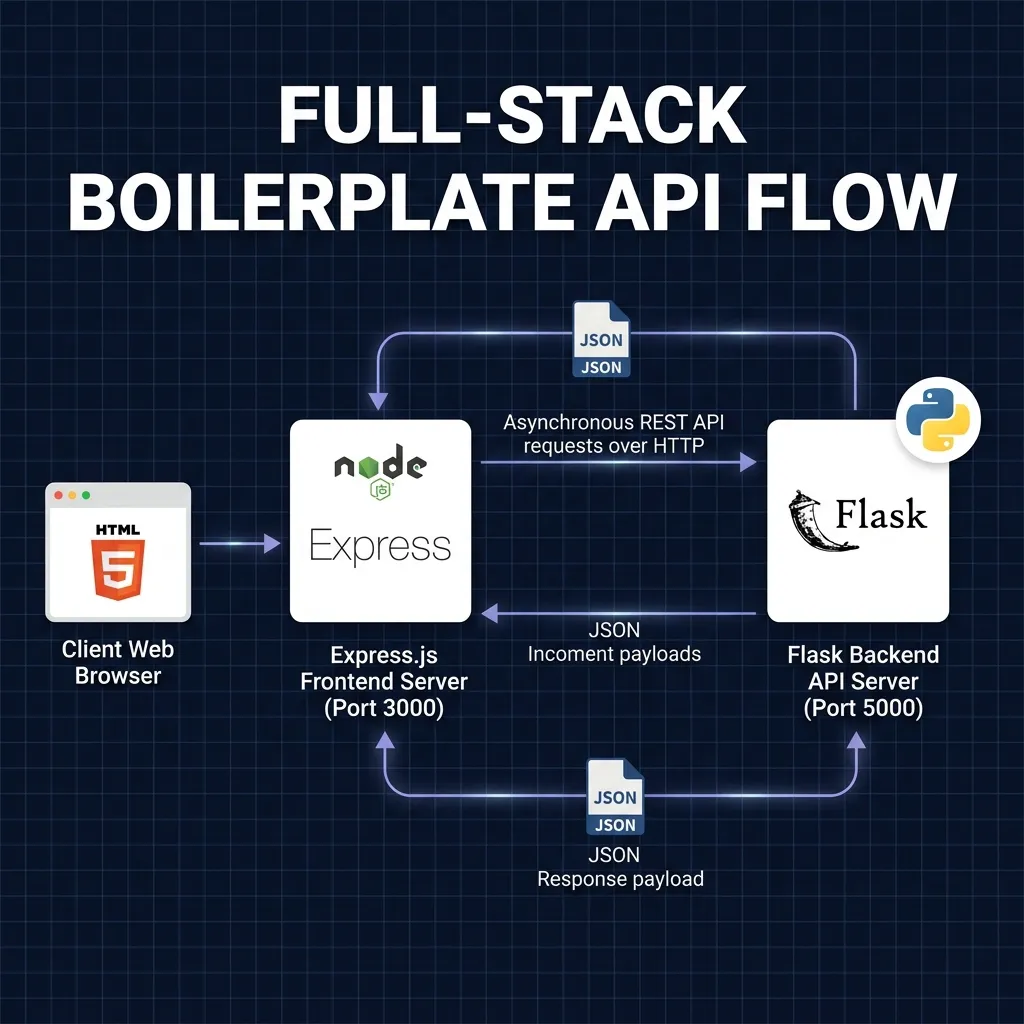
Simple Full Stack App Frontend Express Backend Flask
Full-Stack Starter App | Express.js Frontend | Flask Backend | Node.js web UI integrated with Python API | Clean boilerplate | Simple routing | JSON data exchange | Ideal for cross-stack web development and rapid prototyping

apibackendboilerplatecross-platformcruddevtoolsexpressjsflaskfrontendfullstack
Code

// architecture

Simple Full Stack App Frontend Express Backend Flask

User Request ➔ Express Frontend (Port 3000) ➔ Flask Backend (Port 5000)
Express Web Interface Service (serve static UI assets)
Flask JSON API Controller (REST endpoint routing)
JSON Bidirectional Data Exchange Loop (HTTP fetch queries)
Cross-Origin Resource Sharing (CORS dynamic authorization)
Problem:Setting up boilerplate configurations for multi-service cross-stack local development manually delays dynamic prototyping and leads to configuration fatigue.
Fix:Engineered a production-ready starter template integrating Express routing and a Flask API, configured with default JSON schemas and CORS security protocols out-of-the-box.
Project Architecture
Zoom Blueprint

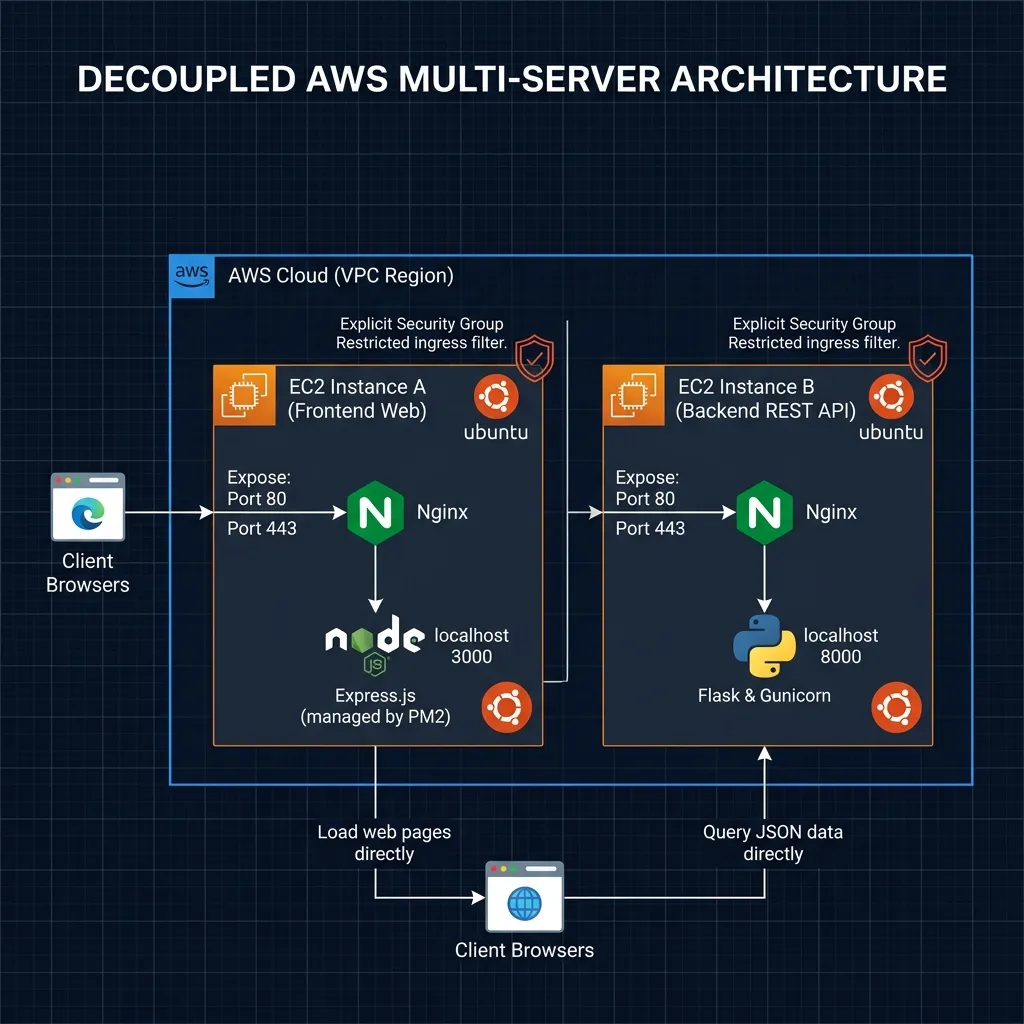
Separate EC2 Instances Separate Hosting Simple Full Stack App
Deploy a full-stack web application with a Flask backend and Express.js frontend, each hosted on separate AWS EC2 instances for enhanced scalability, isolation, and security. | Easy deployment guide for modern cloud architectures.

app-deploymentawsbackendcloud-architecturecloud-deploymentdevopsec2expressflaskfrontend
Code

// architecture

Separate EC2 Instances Separate Hosting Simple Full Stack App

User Request ➔ EC2 Instance A (Frontend App) ➔ HTTP API Requests ➔ EC2 Instance B (Backend API)
Standalone Ubuntu Linux 22.04 LTS Environments
Frontend EC2 Host (Express web process proxied locally via Nginx at port 80/443)
Backend EC2 Host (Flask app run by Gunicorn WSGI proxied locally via Nginx at port 80/443)
VPC Security Group Rules (isolate instances and restrict inbound traffic)
Problem:Co-locating multiple services on a single virtual machine increases security exposure, compromises hardware resource isolation, and expands the system blast radius.
Fix:Architected a fully decoupled multi-instance EC2 deployment blueprint hosting Node/Express and Flask on independent hosts behind custom-configured Nginx reverse proxies.
Project Architecture
Zoom Blueprint

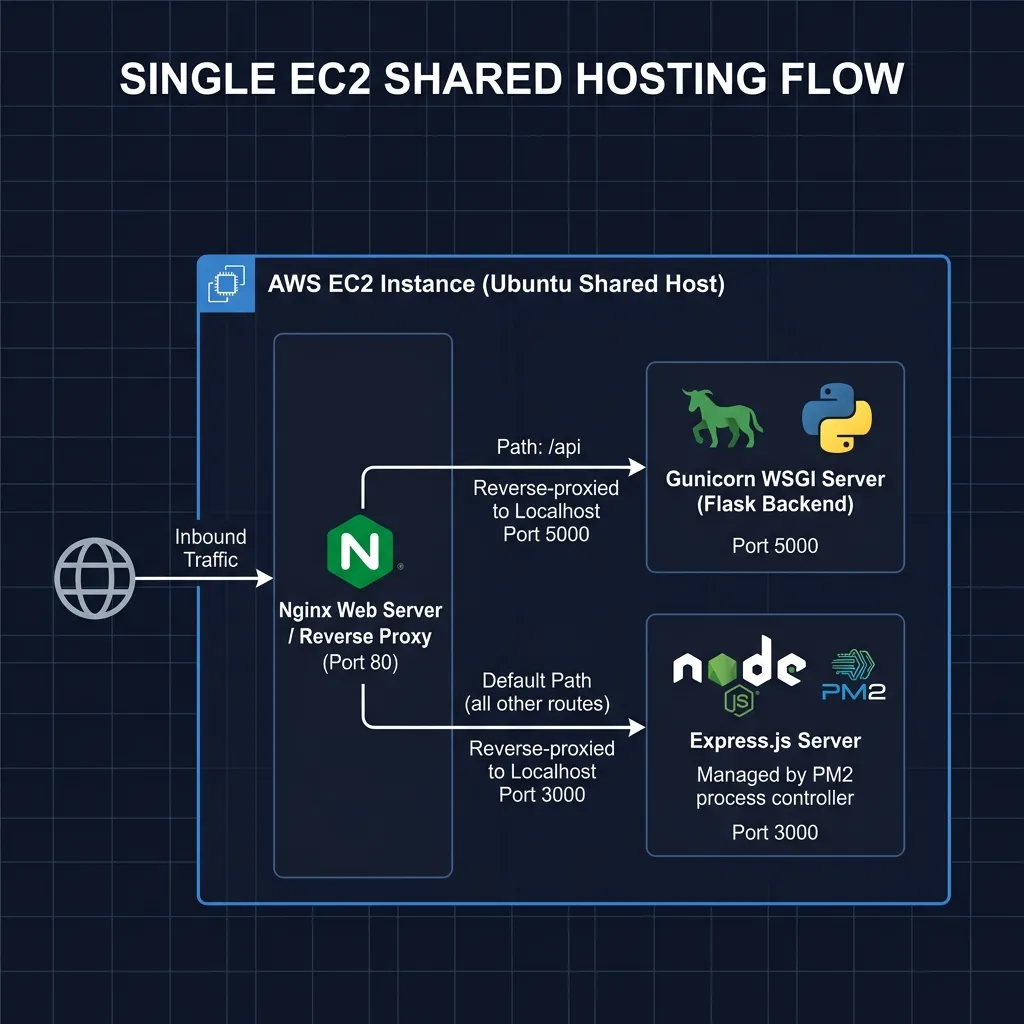
Single EC2 Instance Shared Hosting Simple Full Stack App
Deploy Flask backend & Express.js frontend on a single AWS EC2 with Nginx reverse proxy | Gunicorn & PM2 | Production-ready full-stack hosting solution

aws-ec2cloud-infrastructuredeploymentexpressflaskfull-stackgunicornnginxpm2reverse-proxy
Code

// architecture

Single EC2 Instance Shared Hosting Simple Full Stack App

User HTTP Inbound ➔ Nginx reverse proxy routing (Port 80/443)
Nginx dynamic endpoint path matching (/api requests to port 5000, all others to port 3000)
Co-located services on a single virtual host instance
PM2 Node.js daemon controller managing Express lifecycle (localhost:3000)
Gunicorn WSGI web daemon controller managing Flask backend (localhost:5000)
Problem:Running multiple decoupled web processes on a single server without structured gateway path matching leads to port collisions and configuration drift.
Fix:Engineered a resilient shared hosting model on a single EC2 host deploying Nginx reverse proxying, Gunicorn, and PM2 managers to dynamically route paths and secure local processes.
Project Architecture
Zoom Blueprint

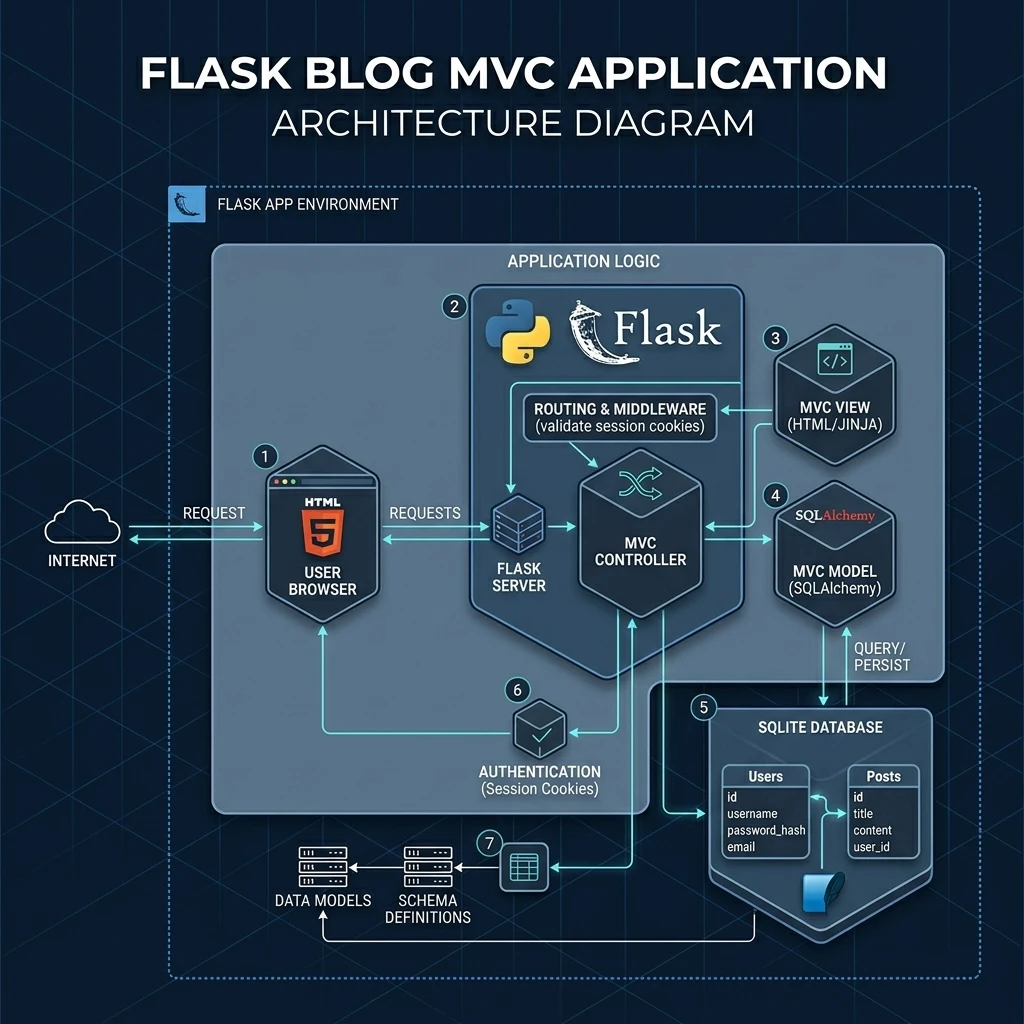
Flask Blog

A full-stack blog app built with Flask, SQLAlchemy & Bootstrap 5. Features auth, role-based admin, CKEditor, comments, contact form, and rate limiting. Deployable on Render.

blogbootstrapckeditorflaskflask-loginflask-wtffull-stackgunicornpostgresqlpython
Code

// architecture

Flask Blog

Flask MVC Engine (server-rendered templates via Jinja2)
SQLAlchemy ORM Data Interface Layer (relational DB schemas)
Local SQLite / Production PostgreSQL Database Instances
Session Cookie State Authorization (Flask-Login hashed validation)
XSS Bleach Sanitization & Custom Form CSRF Protection Tokens
Problem:Building secure, modular, and dynamic web portals from scratch requires integrating complex session authentication, database persistence, and form sanitization layers manually.
Fix:Engineered a robust Flask blog platform implementing secure cookie sessions, SQLAlchemy relational models, and built-in BLEACH XSS filtering for seamless administration and posts management.

Ready to scale your infrastructure?

Whether you're looking for a cloud or devops engineer, I'm ready to help you build the future.

Start a Collaboration